
Gift Alert
TikTok overlays for OBS
The alert that fires on a gift, the counter that climbs on a follow, the goal bar, the chat box: your overlay is everything on top of the video. TokElements gives you the whole layer as a single browser source, and it reacts to your live in real time. Free to start, nothing to download.
Three steps to an overlay on your live
1 · Connect your username
Your public TikTok username is enough. Gifts, follows, likes and chat start arriving; no password, no app.
2 · Place what you want
253 ready widgets across 33 categories, or describe your own in a sentence and let the assistant write it.
3 · One browser source
Paste the overlay link into OBS, Streamlabs or TikTok LIVE Studio at your stream size. Everything you add later appears on it by itself.
Overlay themes whole overlays in one look
Liquid ChromeGift Alert · Liquid Chrome Goal Bar · Liquid Chrome Top 3 Podium · Liquid Chrome Follow, Share & Like Alert · Liquid Chrome Subathon Timer · Liquid Chrome Team Battle · Liquid Chrome Live Chat · Liquid Chrome
Goal Bar
Top 3 Podium
Follow, Share & Like Alert
Subathon Timer
Team Battle
Live Chat
FortniteGift Alert · Fortnite Gift Goal · Fortnite Follow Alert · Fortnite Follower Counter · Fortnite Live Chat · Fortnite
Gift Alert
Gift Goal
Follow Alert
Follower Counter
Live Chat
Pixel ArcadeGift Alert · Pixel Arcade Goal Bar · Pixel Arcade Top 3 Podium · Pixel Arcade Follow, Share & Like Alert · Pixel Arcade Subathon Timer · Pixel Arcade Team Battle · Pixel Arcade Live Chat · Pixel Arcade
Gift Alert
Goal Bar
Top 3 Podium
Follow, Share & Like Alert
Subathon Timer
Team Battle
Live Chat
GraffitiGift Alert · Graffiti Goal Bar · Graffiti Top 3 Podium · Graffiti Follow, Share & Like Alert · Graffiti Subathon Timer · Graffiti Team Battle · Graffiti Live Chat · Graffiti
Gift Alert
Goal Bar
Top 3 Podium
Follow, Share & Like Alert
Subathon Timer
Team Battle
Live Chat
Every kit published so far
Matching sets for one game or one look. One import puts the whole set in your studio.
What goes on a TikTok LIVE overlay
Gift alerts
The real TikTok gift artwork, the sender’s name and the combo count, animated the way you want it.
Counters and goals
Followers, likes, diamonds. A goal bar that fills while the stream runs and celebrates when it lands.
Leaderboards
Top gifters of the session, with avatars, updating live.
Chat and games
A chat box in your own style, quizzes, a wheel, a subathon timer that gifts extend.
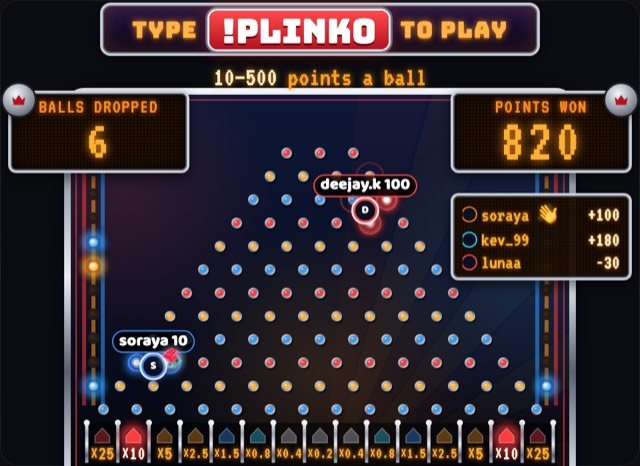
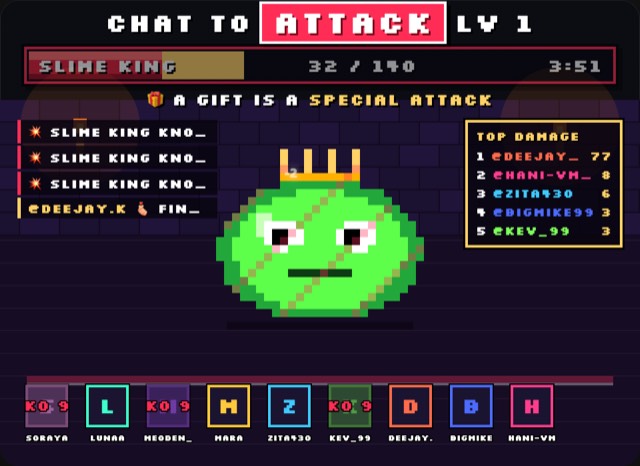
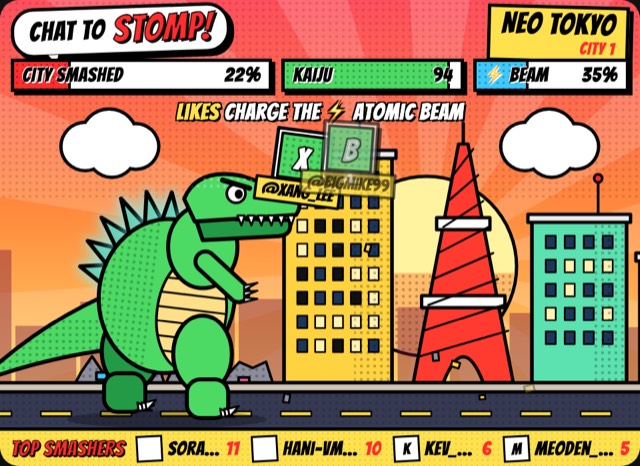
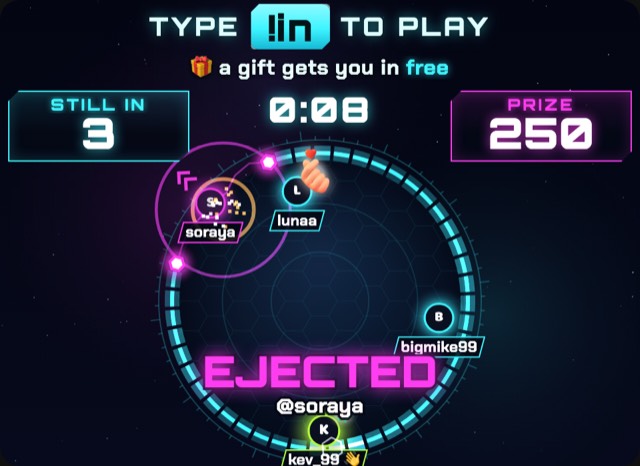
Game widgets
Viewers gift more when a gift does something
A Rose on its own disappears in a second. In a game it becomes a special attack, a free entry or a bigger prize, with the viewer’s name on screen for the whole chat to see. That is why they send the next one.
- 1Every gift is a moveGifts trigger something big and visible on stream, so sending one feels like playing, not paying.
- 2Viewers get seenNames on screen and a live leaderboard. Top gifters stay on top only by gifting again.
- 3There is always a next roundShort rounds keep the chat waiting for the next start, and new viewers join right away.
 LIVE
 LIVE
 LIVE
 LIVE
Questions
What is a TikTok overlay?
It is the layer of graphics on top of your live video: the alert that pops up when somebody sends a gift, the follower counter in the corner, the goal bar, the chat box. On TikTok LIVE it is added by your streaming software, not by TikTok itself.
How do I add an overlay to TikTok LIVE?
Stream through OBS Studio, Streamlabs or TikTok LIVE Studio instead of the phone app. Each of them can show a web page as a Browser Source. TokElements gives you one URL for your whole overlay; paste it in once and everything you place appears on it.
Does it work with TikTok LIVE Studio?
Yes. TikTok LIVE Studio, OBS Studio, Streamlabs and anything else with a browser source all show the same link the same way.
Do I need to give TikTok my password?
No. TokElements reads the events of your public LIVE by username, so gifts, follows, likes and chat arrive without any login to your TikTok account.
Is it free?
The template catalogue is free and runs on your overlay without a subscription. Pro is for running widgets you wrote or generated yourself and for importing kits from other creators.
Can I make my own overlay?
Yes. Describe what you want in a sentence and the assistant writes the widget in html, css and javascript, which you can then edit line by line.
Your overlay, in a few minutes.
Free account, one link into OBS, and the catalogue runs without a subscription.